
Private Parts
Protecting Your Security Online
For AORTA Films' AORTAlive by Alex McGeorge
Specific disclaimers
I am speaking here solely as a private citizen. The views expressed in this deck and presentation are my own and should not be attributed to any current or former employer, nor to their employees, shareholders, or customers. Nothing here is made on their behalf or with their endorsement.
Who the hell is this guy?
Alex McGeorge
- Charming, handsome
- Previously worked at Immunity Inc as a Senior Security Researcher
- Currently a Security Weirdo for a cloud computing provider
- Involved in the Washington DC area leather and kink scene since the mid 90s

Scope of this talk
Out of scope
- ✗Enterprise security
- ✗Cloud computing
- ✗Artificial intelligence
In scope
- ✓Everything else
Who is this class for?
Non-IT professionals and adult content creators
Though others may get something out of it
How will we proceed
We have an enormous amount of content to cover I would prefer not to get into a technical dick measuring competition

What problems will we be tackling?
- Enough technology background to understand the advice
- Creating good privacy habits
- Increasing the difficulty of executing on specific threats
What I cannot teach you in 90m (or at all)
- Enough cyber opsec to be completely safe
- Counter-intel or Counter-Surveillance
- Clowning on law enforcement
Introduction to Relevant Technology

Multi Factor Authentication
- Combines something you have
- With something you know
- Simply knowing your password is no longer enough to sink you
- Enable it on: your email, your financial institutions, health care
- Boot keys for your laptop / desktop
Password Managers
- A secure, encrypted vault that remembers all your passwords for you — you only have to remember one master password to unlock it
- No specific product recommendations
- Different password for each site you use (no derivatives)
Anti-virus
- Protects the device it's installed on (computer / phone) from malware
- A mixed bag, choose one that annoys you the least and is within your budget
- If your budget is $0:
SSL
- Secure Sockets Layer
- It's the s in https://www.google.com
- Scrambles the conversation between your device and a website so that anyone watching in between just sees gibberish
- It protects your data in transit — it does not protect you once the data arrives, or if your device itself is compromised
Virtual Private Networks
- A technology that establishes an encrypted connection between your computer and another
- Traffic that would normally go out to the internet will now go through this connection or 'tunnel' BEFORE going to its final destination
- Additional reading
A simplistic overview of how the internet works
 You
You
 Your router
 The internet
Google's routers
The internet
Google's routers
Now with a VPN
You
Your router
The internet
 VPN server
The internet
Google's routers
VPN server
The internet
Google's routers
Attacks in context
You
Your router
The internet
VPN server
The internet
Google's routers
Thoughts on VPNs
- Can be very useful for local threats
- Understand that VPN providers may or may not keep logs (assume they do)
- Understand that "offshore VPNs" may not be out of reach by the US or allied legal systems
- TorrentFreak does quarterly VPN Reviews that are worth reading
- I've heard people like: Private Internet Access, Proton VPN, CryptoStorm
TOR
- What is Tor and why you should use it
- Should I use the Tor browser bundle?
- You still need to be cautious about how you use it
A combination that works
Use Tor (anonymity) to connect to your anonymous VPN (privacy)
It will be extremely slow though
Encryption for data at rest
- Full Disk Encryption for Windows
- FDE for MacOS
- Encrypting external drives
Cryptocurrency is more than Bitcoin
Cellphones and messaging apps
The reality of radios
- Networks it has joined before
- Device name & hardware IDs
- "I'm here" — over and over
- Alex, what is wardriving? (WiGLE.net)
Understanding the environment
- Turn off your phone's backups
- Subpoena's, The Fappening
- Set a task to reboot your phone every day
- If your friend's phone is snatched assume all conversations it saw are now compromised
Are Twitter DMs safe?
No, read the Twitter Legal FAQ
Is Facebook Messenger Safe?
Lol No
Is Telegram Safe?
Nope, read some of the privacy concerns here
Is WhatsApp Safe?
What about Signal?
This is the only and best answer to secure messaging and calling on mobile devices
But WHY signal?
- List of third party audits of Signal
- Active measures against tools like Cellebrite
Ok how do I use Signal the right way?
- Configure disappearing messages
- Set up sensitive notification options
- Require a PIN to use the app
But Alex my friend told me about this new messaging app...
USE SIGNAL
Alex how do Cops get on my phone?
- What's a vulnerability? What's an exploit?
- Physical access vs Over the Air
- Commercial products/companies like
- https://www.grayshift.com/
- https://cellebrite.com/en/home/
- https://en.wikipedia.org/wiki/NSO_Group
- https://en.wikipedia.org/wiki/Stingray_phone_tracker
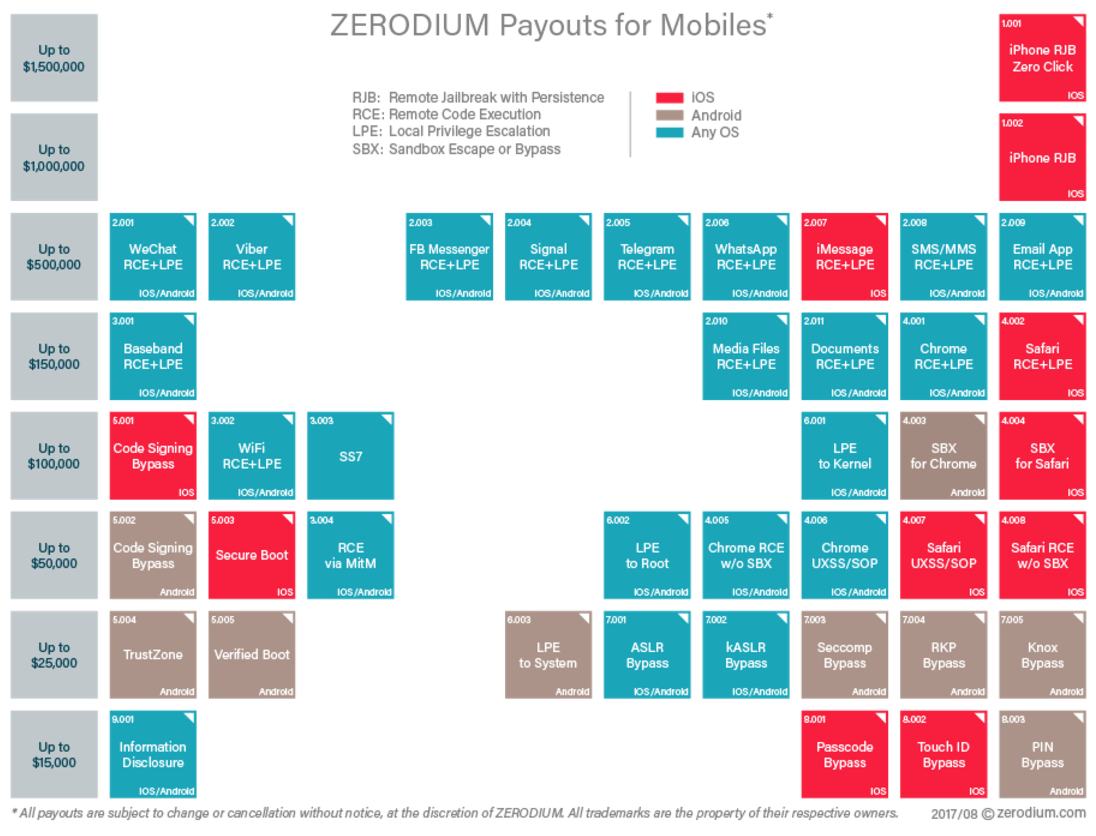
What is the zero day market and what does it look like? (2017)
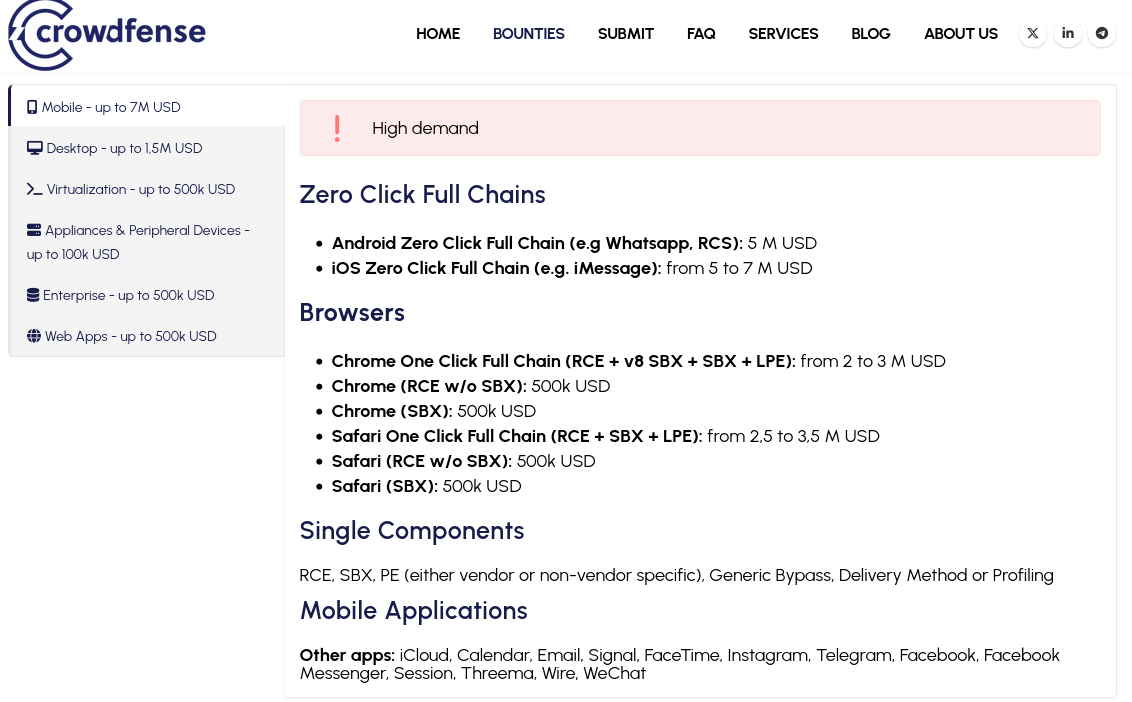
Current Public Acquisition Prices in 2026
What does this mean for me?
- You are unlikely to be a priority intelligence target. However...
- Local and federal cops have access to some of this
- These tools have to be made by someone
- Keep your phone(s) up to date
Metadata
- Data about your data — information a file carries that describes it, often without your realizing
- On its own it may seem harmless; correlated, it can identify or locate you
- Common examples embedded in photos and video:
- GPS coordinates (latitude / longitude) of where it was taken
- Make and model of the phone or camera
- Date and time it was captured
- Software used to edit it, and OS / device details
- Unique device or serial identifiers
Scrub metadata before you upload
Own the last step. Don't trust the destination site to strip your metadata — scrub it before upload.
An Example Process
- Your editing toolchain may be unique to you — whatever is the last piece of software you use before you upload is where you need to scrub metadata
- If it doesn't offer that functionality you can use:
- REMEMBER: if you upload something to a site which will 'clean your metadata' now the site has a copy of the original version of the thing you uploaded
A brief note on pictures
Threat Modeling for Content Creators

What is threat modeling?
- Who is the threat actor we're worried about?
- What threat do they pose to us?
- What can we do to make carrying out that threat harder?
Mitigations
- First thing you can do to make it harder
- Second mitigation with more detail
- Third mitigation
- A fourth, because this column holds the most
Mitigations
-
Create a dedicated professional email address and socials
- Your professional accounts should not be related to or reference your personal accounts
- All professional socials are connected to the professional email
- Only access professional socials and email from those dedicated devices
- Use a password manager to create unique and complex passwords
Mitigations
- An honest assessment
-
Tools
- PimEyes
- Most of your favorite search engines allow search by image
- Talk with your friends and family
Mitigations
- Consumer Reports review of information removal services (2024)
- This will be a recurring process (monthly/quarterly)
- Goal: You know more about what information about you is acquirable at any given time than the person(s) you're worried about
- A realistic assessment
Mitigations
- Where possible use dedicated devices for professional and personal computing
- Only conduct work, especially any fan interactions, from a VPN
-
Do not click links from fans
- If you must, do so from a virtual machine, container or cloud browser/desktop solution
Mitigations
- General rule: LEO has possession of your phone → most things on it are theirs now
-
Crossing a border into/out of the US? LEO has
surprisingly broad powers
- Factory reset your device before arriving at the border or customs
Mitigations
-
Before going to where fans are, disable WiFi and Bluetooth
on any phone you have with you
- Some phones let you air drop etc, also disable services like this
- If you need to use the WiFi at the event: delete the networks you normally use from your phone's memory
Mitigations
- Upload the photo after scrubbing metadata
- Upload after you've left the area where the photo was taken
Introduction to Good Privacy Habits

You are the weakest link
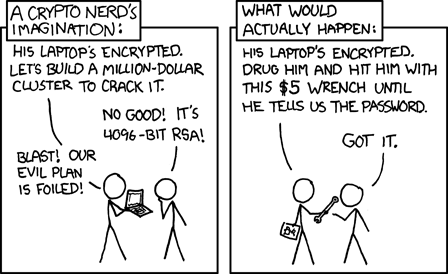
This doesn't work retroactively

No one will go to jail for you

...

The best thing you can do

Compartmentalization
- Where possible separate devices for compartments
- Always separate accounts for different compartments
Common Scenarios

Don't talk to the fucking cops

Helpful videos on why not to talk to the cops
But what if I have to?
- Look for ACLU chapters in your state, see what advice they have
- ACLU of Washington DC
- ACLU of Maryland
- ACLU of Virginia
- ACLU of New Jersey
- ACLU of New York
Attending a Political Action
Phones
- Do you have a protest phone that only has Signal? Why not bring that
- Disable biometric unlocking (fingerprint, face)
- Keep the phone off or in a faraday bag when not in use
- Use Signal to make/receive calls
Person
- Assume you will be separated from your phone, write important phone numbers on your person
- Clear out your wallet, bring your ID, cash, dedicated transit passes
- Have multiple plans and routes to get home
Organizing a Political Action
Too complicated for this talk but start here (audio)
This talk is also good and relevant
Obtaining medical care
As of writing it is unclear how individual jurisdictions will enforce healthcare restrictions
Obtaining medical care (Plan Ahead)
- Create a dedicated email to communicate about your medical needs
- Access this email through a VPN but not from any device you will bring with you
Coordination
- Coordinate with the doctor's office for what you need to have on you the day of
- Plan your route to a location close to your doctor's office, print out directions
- Tell the minimum number of people possible, remember no one will go to jail for you
Obtaining medical care (Day Of)
Phones
- If possible bring a pay as you go phone which can run signal
- Don't connect the phone to anything you use regularly
- Disable biometric unlocking (fingerprint, face)
- Keep the phone off or in a faraday bag when not in use
- Use Signal to make/receive calls
Person
- Assume you will be separated from your phone, write important phone numbers on your person
- Clear out your wallet, bring your ID, proof of insurance
- Memorize the route from the first location to your doctor's office
Crossing a Border in 2025
Phones
- Best plan: Bring a dedicated phone with you, have nothing on it but essential phone numbers
- Disable biometric unlocking (fingerprint, face)
- Set your phone to airplane mode, disable WiFi, Bluetooth, GPS, NFC
- Turn your phone off when going through customs
Computers
- Best plan: Bring a dedicated laptop with nothing else on it, download sensitive info once across the border
- Make sure you have full disk encryption for any computer
- Encrypt any external devices
- Turn your computer off when going through customs
I dont want to be associated with a place I go
- Leave your phone at home
- Take public transit
- Have a dedicated transit pass
- Pay for it with cash
- Get a new one when it runs out of money
- Only pay with cash for anything at the location
Things you can do
Become a student of the game
While we still have due process and a court system:- Read relevant indictments
- Learn how to locate and request access to court documents
- What can your local library do for you?
- What technology companies supply local, state and federal law enforcement
- Interesting exercise: what is the corpus of all LEO specific software used by a given jurisdiction?
Shopping Lists
- Faraday bags (acquire or learn to make)
- Cheap and disposable computing
- Think Craiglist or other local marketplaces
- Pay cash, completely wipe all drives or replace them entirely
- What's in your go bag?
Computery skills to acquire
- Learn how to wipe a computer: ShredOS is great
- Learn how identify the internal components of a computer and how to physically destroy them
- Get comfortable with Linux and virtualization:
- OSINT
- Customizing and compiling software
Acknowledgements



Questions |
Anonymous Feedback |
 |
 |